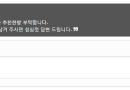
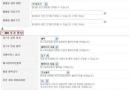
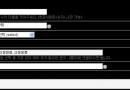
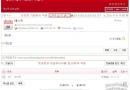
위의 이미지와 같이 댓글을 유도하는 문구를 각 게시판별로 남기는 방법입니다.
게시판모듈에서 수정할 스킨을 선택해서 (sketchbook5을 예로 듭니다)
1. skin.xml를 열어서 적당한 곳에 추가
<var name="comment_induce_mid" type="text">
	<title xml:lang="ko">댓글 유도 mid</title>
	<title xml:lang="en">Comment Induce Mid</title>
	<description xml:lang="ko">댓글 유도 문구표시할 mid명</description>
	<description xml:lang="en">Comment Induce Mid</description>
</var>
<var name="comment_induce_text" type="textarea">
	<title xml:lang="ko">댓글 유도 문구</title>
	<title xml:lang="en">Comment Induce Text</title>
	<description xml:lang="ko">댓글 유도 문구를 작성하세요.</description>
	<description xml:lang="en">Comment Induce Text</description>
</var>
2. _read.html를 열어서
<!--// Comment Write : Top -->
<include cond="$oDocument->allowComment() && !$mi->cmt_wrt_position" target="_comment_write.html" />
상단에 아래 소스 추가
<block cond="$mid==$mi->comment_induce_mid">
<div class="cmtInduce">
<!--@if ($oDocument->get('comment_count') <= 0 ) -->
	<ul style="margin-bottom:10px;"><i class="fa fa-quote-left" aria-hidden="true"></i> 댓글이 하나도 없네요ㅠㅠ <i class="fa fa-quote-right" aria-hidden="true"></i></ul>
<!--@end-->
	<ul><i class="fa fa-quote-left" aria-hidden="true"></i> {$mi->comment_induce_text} <i class="fa fa-quote-right" aria-hidden="true"></i></ul>
</div>

</block>
지정한 mid게시판에서 댓글이 한개도 없어면 "댓글이 하나도 없네요ㅠㅠ"문구가 나오고,
작성자가 적은 문구가 아래 나타납니다.
3. board.css를 열어서 추가
.cmtInduce { background-color:#555555; font-size:1.0em; color:#ffffff; padding:10px; -webkit-border-radius:10px;-moz-border-radius:10px; border-radius:10px; margin-bottom:10px; }


 메뉴 클릭시 화면 중앙에 팝업으로 띄우기
 Sub위젯영역에 마우스Over시 둥근테두리 나...