얼음조각티님이 기초적인 틀을 만들어 주고, 제가 약간의 디자인을 추가하여 얼음조각티님의 허락을 득한 후 모듈로 배포합니다.
[V 2.0 수정]
• 설정을 모듈에서 직접 관리 게시글 별 평점 모듈 V2.0
• 최소한의 게시판 스킨 수정 - V2.0
• 두 버전을 분리하는 이유는 사용자가 유리한 것을 선택하면 됩니다 - V1.5.2이 각 게시판 별로 형태나 색상을 다르게 적용 가능
• SketchBook5 게시판스킨 - 문하우스 수정버전 V3.5 를 사용할려면 V1.5.2를 설치하는게 좋습니다 - 특히 프로필 부분등
[V 1.5.2 수정]
1. 평가 취소 버턴 추가

2. 모듈 설정에 설치 메뉴얼 추가
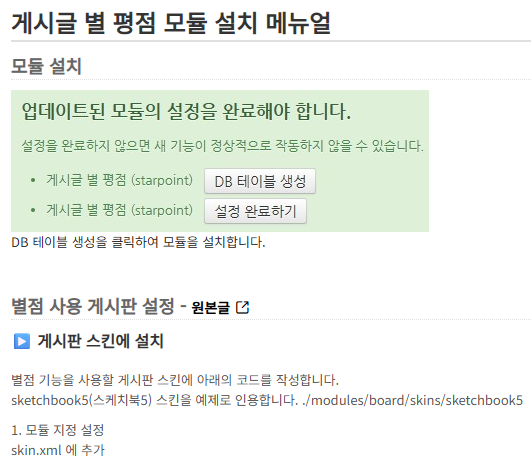
3. vote_members.html 파일을 starpoint 모듈로 이동
[V 1.5 수정]
* 주의사항 - 기존 사용자는 게시판 설정을 다시 해야합니다.(기본스킨이 Simple 스킨 으로 변경)
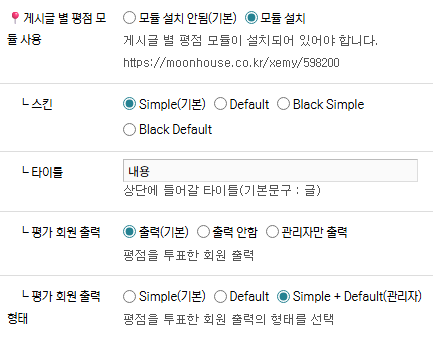
1. 스킨 추가 지정 - Simple, Default, black_simple, black_default
<var name="star_point" type="radio">
    <title>게시글 별 평점 모듈 사용</title>
    <description>게시글 별 평점 모듈이 설치되어 있어야 합니다.
    https://moonhouse.co.kr/xemy/598200</description>
    <options value="">
        <title>모듈 설치 안됨(기본)</title>
    </options>
    <options value="Y">
        <title>모듈 설치</title>
    </options>
</var>
<var name="starpoint_skin" type="radio">
    <title> ┖ 스킨</title>
    <description/>
    <options value="">
        <title>Simple(기본)</title>
    </options>
    <options value="d">
        <title>Default</title>
    </options>
    <options value="b_s">
        <title>Black Simple</title>
    </options>
    <options value="b_d">
        <title>Black Default</title>
    </options>
</var>
<var name="starpoint_text" type="text">
    <title> ┖ 타이틀</title>
    <description>상단에 들어갈 타이틀(기본문구 : 글)</description>
</var>
<var name="vote_members" type="radio">
    <title> ┖ 평가 회원 출력</title>
    <description>평점을 투표한 회원 출력</description>
    <options value="">
        <title>출력(기본)</title>
    </options>
    <options value="N">
        <title>출력 안함</title>
    </options>
    <options value="A">
        <title>관리자만 출력</title>
    </options>
</var>
<var name="vm_form" type="radio">
    <title> ┖ 평가 회원 출력 형태</title>
    <description>평점을 투표한 회원 출력의 형태를 선택</description>
    <options value="">
        <title>Simple(기본)</title>
    </options>
    <options value="D">
        <title>Default</title>
    </options>
    <options value="T">
        <title>Simple + Default(관리자)</title>
    </options>
</var>
<!--// 글 별평점 모듈 -->
<include cond="!$module_info->star_point =='' && $module_info->starpoint_skin ==''" target="/modules/starpoint/skins/simple/rating.html" />
<include cond="!$module_info->star_point =='' && $module_info->starpoint_skin =='d'" target="/modules/starpoint/skins/default/rating.html" />
<include cond="!$module_info->star_point =='' && $module_info->starpoint_skin =='b_s'" target="/modules/starpoint/skins/black_simple/rating.html" />
<include cond="!$module_info->star_point =='' && $module_info->starpoint_skin =='b_d'" target="/modules/starpoint/skins/black_default/rating.html" />

<!-- 글 별평점 모듈 평가 회원 출력 -->
<include cond="!$module_info->star_point =='' && $module_info->vote_members ==''" target="vote_members.html" />
<include cond="!$module_info->star_point =='' && $module_info->vote_members =='A' && $logged_info->is_admin == 'Y'" target="vote_members.html" />
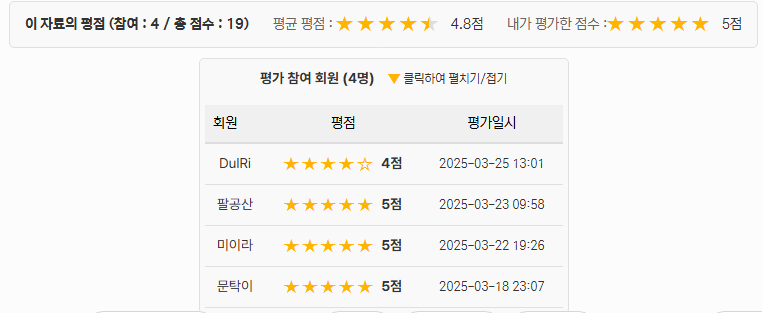
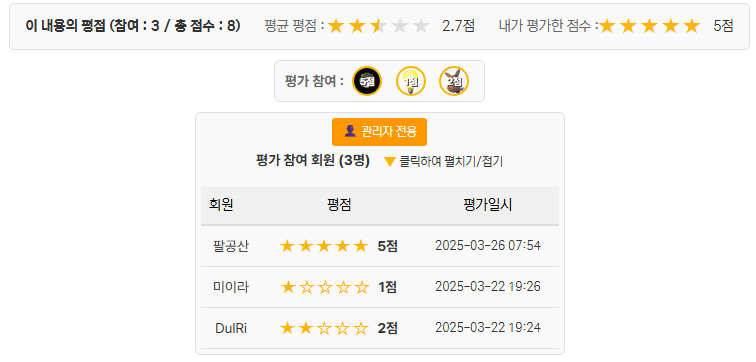
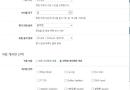
2. 평가 회원 출력 추가 - 일반 출력, 관리자만 출력, 출력 안함
평가 회원 출력 형태 - Simple, Default, Simple + Default(관리자)
[Default]
[Simple - 평점은 관리자만 보임]

[Simple + Default(관리자) - Simple은 모두에게 출력 Default형은 관리자만 출력]
[V 1.4 수정]
1. 스킨 지정 - Default, Simple
평점모듈 이지만 게시판 스킨에서 설정과 수정이 많습니다.
어느 것이 정답인지는 모르겠지만 게시판 스킨 수정이 활용 범위가 더 넓은 것 같네요 (모듈 설정 능력이 안 되는 하수의 변명 ㅠㅠ)
스킨을 지정할려면 게시판 스킨의 skin.xml 와 _read.html 에 코드를 추가해야 합니다.
<var name="starpoint_skin" type="radio">
    <title> ┖ 스킨</title>
    <description/>
    <options value="">
        <title>Default(기본)</title>
    </options>
    <options value="s">
        <title>Simple</title>
    </options>
</var>
<!--// 글 별평점 모듈 -->
<include cond="!$mi->star_point =='' && $mi->starpoint_skin ==''" target="/modules/starpoint/tpl/rating.html" />
<include cond="!$mi->star_point =='' && $mi->starpoint_skin =='s'" target="/modules/starpoint/tpl/simple/rating.html" />
2. 평가하기시 별에 마우스 오버시 평가점 출력
[Simple 스킨] https://moonhouse.co.kr/xetip/598109

[V 1.3 수정]
1. 평가가 DB에 저장되지 않는다는 이슈가 있어서 수정했습니다.
2. 기존의 사용자중 평가가 없거나 중요하지 않으면 DB에 접속해서 rx_document_star 테이블 삭제해서
초기화후 관리자 설정에서 모듈 업데이트후 사용하면 깔끔합니다.
3. DB 오류나 다른 문제가 있으면 댓글이나 깃허브 이슈로 남겨주세요.
[V 1.2 수정]
1. 본인의 글은 평가할 수 없게 수정 (socialskyo)
2. 디자인을 심플하게 수정
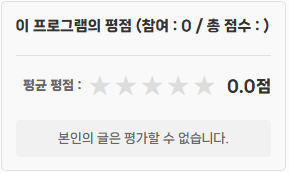
3. skin.xml 에 빨간색 부분 추가 - 타이틀부분(글) 변경 가능
sketchbook5 게시판스킨이 아니면 _read.html 파일의 상단에 아래 파란색 코드 추가해야 정상 작동합니다.
{@ $mi = $module_info; }
$module_info로 작성시 starpoint모듈의 설정을 가져 올려고 하다보니 타이틀 변경이 안되고
$mi로 작성해야 해당 게시판 스킨의 설정을 가져 옵니다.
[설치 방법]
1. 다운 받은 모듈을 설치 - 관리자 설정 없음
2. 게시글 별 평점 모듈을 적용할 게시판 스킨의 파일에 아래의 코드를 작성합니다.
(예 : /modules/board/skins/sketchbook5)
<var name="star_point" type="radio">
    <title>게시글 별 평점 모듈 사용</title>
    <description>게시글 별 평점 모듈이 설치되어 있어야 합니다.</description>
    <options value="">
        <title>모듈 설치 안됨(기본)</title>
    </options>
    <options value="Y">
        <title>모듈 설치</title>
    </options>
</var>
<var name="starpoint_text" type="text">
    <title> ┖ 타이틀</title>
    <description>상단에 들어갈 타이틀(기본문구 : 글)</description>
</var>
<include cond="!$mi->star_point =='' && $mi->starpoint_skin ==''" target="/modules/starpoint/skins/simple/rating.html" />
3. 게시판 스킨 설정에서 "게시글 별 평점 모듈 사용" 에서 "모듈 설치"를 선택하면 됩니다.
[비로그인 화면]
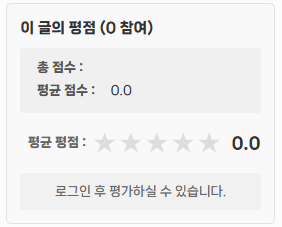
[로그인 회원 화면]
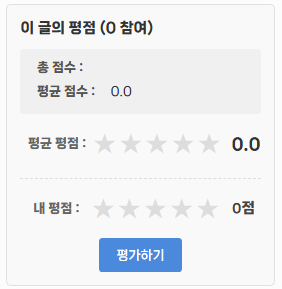
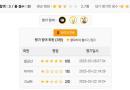
[평점후 화면]

-Tip-
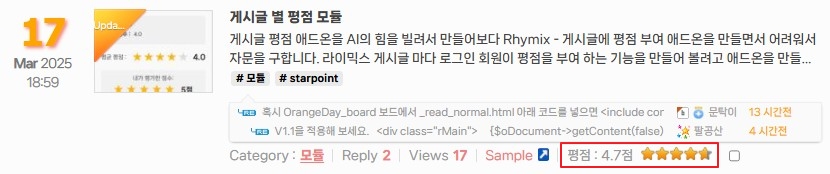
[ 게시글 목록에 별 평점 출력하기 ] https://moonhouse.co.kr/xemy
주의 : 모듈이 설치 되지 않은 상태에서 코드 적옹시 DB오류를 일으킵니다.
<var name="star_user" type="radio">
    <title> ┖ 게시글 목록에 평점과 형태출력</title>
    <description>게시글의 목록에 평점과 형태를 선택 합니다.
    ????주의 : 모듈이 설치 되지 않은 상태에서 출력 선택시 DB오류를 일으킵니다.</description>
    <options value="">
        <title>출력안함(기본)</title>
    </options>
    <options value="all">
        <title>전부 출력</title>
    </options>
    <options value="point">
        <title>평점만</title>
    </options>
    <options value="star">
        <title>별만</title>
    </options>
</var>
<!-- 여기에 평점 표시 부분 추가 -->
<block cond="!$module_info->star_point ==''">
    {@
        $oStarPointModel = getModel('starpoint');
        $total_point = $oStarPointModel->getDocumentRatedTotalPoint($document->document_srl);
    }
    <!--@if($total_point->avg > 0)-->
        <span cond="!$module_info->star_user == ''" class="starpoint">
            <span>평점 :</span>
            <span cond="$module_info->star_user == 'all' || $module_info->star_user == 'point'" class="score">{number_format($total_point->avg, 1)}점</span>
            <span cond="$module_info->star_user == 'all' || $module_info->star_user == 'star'" class="starRating pr_tooltip" pr_color="dark" pr_position="b_right" title="{number_format($total_point->avg, 1)}점">
                <span style="width:{$total_point->avg*20}%">{number_format($total_point->avg, 1)}</span>
            </span>
        </span>
    <!--@end-->
</block>
.starRating,
.starRating span{overflow:hidden;display:inline-block;height:14px;background:transparent url(../img/white/iconStarRating.png) no-repeat}
.starRating{width:79px;vertical-align:middle;text-align:left !important}
.starRating span{font-size:0;line-height:0;vertical-align:top;text-indent:-100px;*text-indent:0;background-position:0 -14px}

/* 별점 스타일 */
.starpoint { display: inline-block; vertical-align: middle;}
.starpoint .score { display: inline-block; margin-right: 5px; vertical-align: middle;}
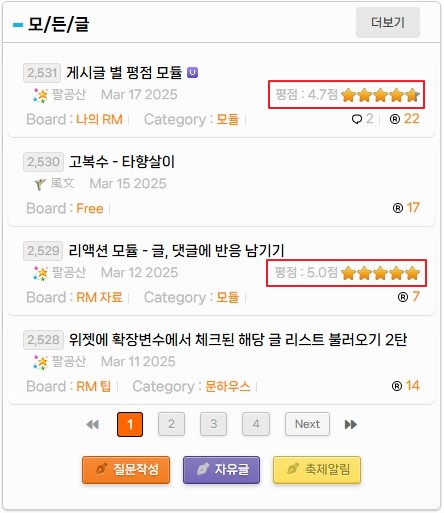
[ 위젯에 별 평점 출력하기 ] https://moonhouse.co.kr
주의 : 모듈이 설치 되지 않은 상태에서 코드 적옹시 DB오류를 일으킵니다.
<var id="star_point">
    <name>평점 표시</name>
    <description><![CDATA[
    <a href="https://moonhouse.co.kr/xemy/598200" target="_blank" style="color:#ff6600">게시글 별 평점 모듈</a> 설치가 필수입니다.]]>
   ????주의 : 모듈이 설치 되지 않은 상태에서 표시 선택시 DB오류를 일으켜 전체 페이지가 열리지 않습니다.
    </description>
    <type>select</type>
    <options>
        <name>표시하지 않음</name>
        <value></value>
    </options>
    <options>
        <name>표시</name>
        <value>Y</value>
    </options>
</var><var id="star_user">
    <name> ┖ 목록 평점 형태</name>
    <description>위젯 목록에 평점 형태를 선택 합니다.</description>
    <type>select</type>
    <options>
        <name>전부 출력</name>
        <value>all</value>
    </options>
    <options>
        <name>평점만</name>
        <value>point</value>
    </options>
    <options>
        <name>별만</name>
        <value>star</value>
    </options>
</var>
<!-- 여기에 평점 표시 부분 추가 -->
<block cond="!$widget_info->star_point == ''">
    {@
        $oStarPointModel = getModel('starpoint');
        $total_point = $oStarPointModel->getDocumentRatedTotalPoint($oDocument->document_srl);
    }
    <!--@if($total_point->avg > 0)-->
        <span class="starpoint">
            <span>평점 :</span>
            <span cond="$widget_info->star_user == 'all' || $widget_info->star_user == 'point'" class="score">{number_format($total_point->avg, 1)}점</span>
            <span cond="$widget_info->star_user == 'all' || $widget_info->star_user == 'star'" class="starRating pr_tooltip" pr_color="dark" pr_position="b_right" title="{number_format($total_point->avg, 1)}점">
                <span style="width:{$total_point->avg*20}%">{number_format($total_point->avg, 1)}</span>
            </span>
        </span>
    <!--@end-->
</block>
위젯 따라 빨간색 부분 $oDocument->document_srl 을 바꾸어 주어야 합니다。
content 위젯의 경우는 $item->get('document_srl') 으로 처리됩니다。
/* 평점 표시 부분 */
.starpoint { display: inline-block; margin-left: 5px; float:right; }
.starpoint .score { color:#bbb; }
.starRating,
.starRating span { overflow:hidden;display:inline-block;height:14px;background:transparent url(이미지경로/iconStarRating.png) no-repeat}
.starRating { width:79px;vertical-align:middle;text-align:left !important}
.starRating span{ font-size:0;line-height:0;vertical-align:top;text-indent:-100px;*text-indent:0;background-position:0 -14px}


 게시판 기능 확장 모듈 V1.2



<include cond="!$mi->star_point ==''" target="/modules/starpoint/tpl/rating.html" />
이게 어딜넣어도 게시판이 약간 약간 이상한데로 붙던데 혹시 본문 하단에 넣을려면 다른곳에 넣어야되나요,ㅠ_ㅠ