- 게시판 문서 로드시에는 원댓글만 로드했다가, 대댓글은 별도의 링크를 통해 ajax로 따로 로드하는 애드온입니다.
- 바로 실사용하기보다는, 충분한 테스트를 거쳐 버그 정보 및 개선 사항을 공유하고 함께 버전업을 한 뒤 실사용하시기를 권합니다.
- 이런 방식의 댓글 로딩은 몇 가지 장단점이 있을 것 같습니다.
- 장점 : 체계화된 댓글 출력, 포럼식 소통의 강화, 리소스 절약
- 단점 : 댓글 관련 서드 파티 자료들의 링크 방식을 대대적으로 손볼 필요가 있음(url에 comment_srl 파라미터가 있어야 좋습니다), 검색 엔진의 대댓글 접근 약화(이건 그냥 예상입니다)
- 애드온의 작동 방식, 적용 방법, 스킨 활용 등에 대한 보다 자세한 사항은 아래의 링크를 참고해주세요.
- 미리보기 : https://dev.aporia.blog/board_fKje47/40977
- 적용 방법 : https://dev.aporia.blog/board_fKje47/41206
업데이트 0.1.0 (2022.03.28)
- 코어의 dispBoardCommentPage 액션을 통해 사용 중인 스킨의 comment.html 부분을 직접 불러들임
1) 더 이상 애드온 스킨을 사용하지 않음
2) 0.1.0에서는 애드온 설정을 사용하지 않음
3) 외부 php 파일을 사용하지 않음
: 람보님 덕분에 애드온 구조가 훨씬 깔끔해졌습니다 :D
4) 다른 서드파티 자료들과의 호환성 강화
- 대댓글을 로드할 때 스크롤 이동을 하지 않음
- url에 comment_srl 파라미터만 있고 댓글번호에 해당하는 해시(#)가 없을 경우 자동으로 해시 첨가
- 기타 코드 및 파일 정리
* 기존 0.0.1 버전 사용자는 게시판 스킨의 _comment.html의 대댓글 링크에서 onclick 속성을 다음과 같이 바꿔주어야 합니다.
- onclick="getRecommentList(this, {$comment->comment_srl}); return false;"
[문하우스 sketchbook5_MH 와 댓글위젯에 적용팁]
애드온 설치를 하고 제법 해 줘야 할 일이 많습니다.
https://dev.aporia.blog/board_fKje47/41206 에 있는 방법을 따라 합니다.
1) 대댓글 열기 링크 삽입


	<a cond="$comment->recomment_count > 0" class="ico_secret" href="#" onclick="getRecommentList(this, {$comment->comment_srl}); return false;" style="text-decoration: none;color: white;font-weight: normal;">대댓글({$comment->recomment_count})</a>
	보통은 id="comment_{$comment->comment_srl}"라는 속성이 있는 태그 안쪽이면 어디든 괜찮을 것입니다.
	참고로 이곳 게시판 스킨에서는 <div class="meta"> 태그 안에서 맨 마지막 줄에 삽입했습니다.


2) 댓글 페이지네이션 수정

- a 태그 안의 href 속성 값에 들어가 있는 getUrl 함수를 찾아 괄호 안을 살짝 수정


	보통은 href="{getUrl('cpage',1)}#{$oDocument->get('document_srl')}_comment"이런 식으로 되어 있는데,


=> 이것을 href="{getUrl('comment_srl', '', 'cpage',1)}#{$oDocument->get('document_srl')}_comment" 같은 식으로 수정


	마찬가지로 href="{getUrl('cpage',$page_no)}#{$oDocument->get('document_srl')}_comment" 이것도


=> href="{getUrl('comment_srl', '', 'cpage',$page_no)}#{$oDocument->get('document_srl')}_comment" 으로


	href="{getUrl('cpage',$oDocument->comment_page_navigation->last_page)}#{$oDocument->get('document_srl')}_comment" 이것도


=> href="{getUrl('comment_srl', '', 'cpage',$oDocument->comment_page_navigation->last_page)}#{$oDocument->get('document_srl')}_comment" 으로


3) 스킨 자체 변수의 대댓글 열기 링크 삽입

- 대댓글을 로드할 때는 스킨의 comment.html만 가져옵니다. 따라서 스케치북처럼 __setting.html에 자체 변수를 선언하고 있는 스킨들은 변수 전달에 문제가 있을 수 있습니다.

- 따라서, 스케치북의 경우에는 _comment.html 상단에


	<include target="__setting.html" cond="$comment_head" />


- 라고 다시 한번 선언해주어야 원활한 페이지 구현이 가능합니다.

- 참고로 위 구문에서 $comment_head라는 변수는 대댓글이 있을 경우 애드온에서 전달하는 대댓글들의 헤드, 즉 원댓글의 댓글 번호를 가리킵니다.
1. sketchbook5_MH 수정 - /modules/board/skins/sketchbook5_MH/_comment.html
최상단에 아래 코드 삽입
<include target="__setting.html" cond="$comment_head" />
~ 생략 ~
~ 생략 ~
대댓글 버턴이 댓글의 최하단에 위치하도록 설치 - 댓글의 내용을 읽은 후 대댓글 버턴 클릭

            <!--원댓글만 리스트를 출력했다가, 대댓글은 ajax로 따로 로드-->
            <div style="float:right; margin:10px 0 0 0">
                <a cond="$comment->recomment_count > 0" class="ico_secret sbtn_mini sbtn-green" href="#" onclick="getRecommentList(this, {$comment->comment_srl}); return false;" style="text-decoration:none; color:white"><i class="ri-question-answer-line"></i> 대댓글 <span style="font-weight:bold">({$comment->recomment_count})</span></a>
            </div>
        </li>
    </block>
</ul>


<!--// 댓글 페이지네이션 -->
<block cond="$oDocument->comment_page_navigation">
    <div class="bd_pg clear {$mi->fdb_hide}">
        <a href="{getUrl('comment_srl', '', 'cpage',1)}#{$oDocument->get('document_srl')}_comment" class="direction" title="{$lang->first_page}"><i class="fa fa-angle-double-left"></i> <span>First</span></a>
        <block loop="$page_no=$oDocument->comment_page_navigation->getNextPage()">
            <strong cond="$cpage==$page_no" class="this">{$page_no}</strong>
            <a cond="$cpage!=$page_no" href="{getUrl('comment_srl', '', 'cpage',$page_no)}#{$oDocument->get('document_srl')}_comment">{$page_no}</a>
        </block>
        <a href="{getUrl('comment_srl', '', 'cpage',$oDocument->comment_page_navigation->last_page)}#{$oDocument->get('document_srl')}_comment" class="direction" title="{$lang->last_page}"><span>Last</span> <i class="fa fa-angle-double-right"></i></a>
    </div>
</block>
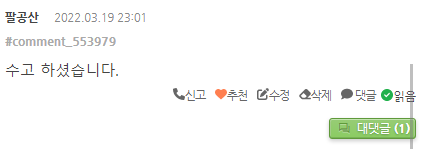
• 댓글 주소 복사의 코드를 수정 - https://xetown.com/download/1670320#comment_1671151
<div style="margin-top:5px">
    <!--댓글 주소 복사-->
    <load target="./js/clipboard.min.js" />
    <a class="copycomLink" style="font-size:12px; color:#aaa" href="#" data-clipboard-text="{getFullUrl('', 'mid', $mid, 'document_srl', $comment->document_srl, 'comment_srl', $comment->comment_srl)}#comment_{$comment->comment_srl}" onclick="return false;">#comment_{$comment->comment_srl}</a>
</div>
https://moonhouse.co.kr/free/553952?comment_srl=553979#comment_553979 이런 형식의 주소가 복사되어야 합니다.
https://도메인/모듈명/게시판NO?comment_srl=코멘트NO#comment_코멘트NO
2. 댓글 위젯에서 대댓글 클릭시 대댓글로 이동하는 코드로 수정 - https://xetown.com/download/1670320#comment_1671395
댓글위젯에서 module_srl(모듈번호)은 출력이 되는데 모듈명이 출력이 안되는 위젯인 경우(위젯 마다 약간씩 차이가 남)
<!--@foreach($wi->comment_list as $key => $val)-->
    {@ $target_mid = ModuleModel::getModuleInfo($val->get('module_srl'))->mid; }
    <ul>
        <li>
            <a href="{getUrl('', 'mid', $target_mid, 'document_srl',$val->get('document_srl'), 'comment_srl', $val->comment_srl)}#comment_{$val->get('comment_srl')}">{$val->getSummary($wi->subject_cut_size)}</a>
        </li>
    </ul>
<!--@end-->
3. content 위젯에 적용 - https://xetown.com/download/1670320#comment_1671286
[수정전]
<a href="{$item->getLink()}" target="_blank"|cond="$widget_info->new_window">{$item->getTitle($widget_info->subject_cut_size)}</a>

[수정후]
<a href="{getUrl('', 'mid', $item->get('mid'), 'document_srl', $item->get('document_srl'), 'comment_srl', $item->get('comment_srl'))}" target="_blank"|cond="$widget_info->new_window">{$item->getTitle($widget_info->subject_cut_size)}</a>
4. 회원 정보 보기의 작성댓글보기 수정
• 관리자설정 > 회원설정 > 디자인 > 스킨 확인 - 회원 기본 스킨(default)
- /modules/member/skins/default/comment_list.html
- /modules/member/m.skins/default/comment_list.html (모바일스킨도 함께)
[수정전]
<tr loop="$comment_list => $no,$comment">
    <td>{$no}</td>
    <td>
        <a href="{getUrl('','document_srl',$comment->document_srl)}#comment_{$comment->comment_srl}" target="_blank">{$comment->getSummary() ?: $lang->msg_no_text_comment}</a>
    </td>
    <td>{$comment->getRegdate("Y-m-d")}</td>
</tr>

[수정후]
<tr loop="$comment_list => $no,$comment">
    <td>{$no}</td>
    <td>
        {@ $target_mid = ModuleModel::getModuleInfo($comment->get('module_srl'))->mid; }
        <a href="{getUrl('', 'mid', $target_mid, 'document_srl',$comment->get('document_srl'), 'comment_srl', $comment->comment_srl)}#comment_{$comment->get('comment_srl')}" target="_blank">{$comment->getSummary() ?: $lang->msg_no_text_comment}</a>
    </td>
    <td>{$comment->getRegdate("Y-m-d")}</td>
</tr>
 다크모드를 구현해 보면서...
 댓글 목록 중 원글 작성자일 경우 조건문을 ...
 Tip이 도움이 되었다면 댓글과 평가 부탁합니다.
Tip에 대한 궁금한 점은 댓글로 남겨 주시면 성심껏 답변 드립니다.
Tip이 도움이 되었다면 댓글과 평가 부탁합니다.
Tip에 대한 궁금한 점은 댓글로 남겨 주시면 성심껏 답변 드립니다. 


